


ABC News: Breaking News Live
3.25.89K Reviews
App Specs
- Version
- Varies with Device
- Updated On
- License
- Free
- Downloads
- 5,000,000+
- Developer
- Disney
- Categories
- News & Magazines
- Platform
- Android, iOS
Screenshots



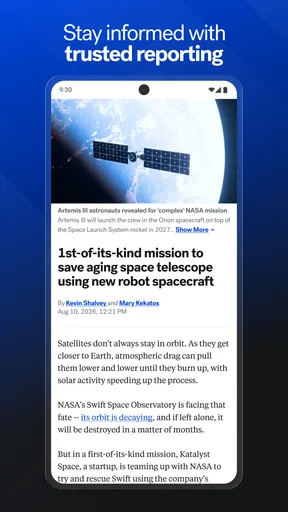
 Analysis by AppCompare
When a news app feels unreliable, it can be hard to tell whether the problem is the app, the connection, or simply a confusing setup. I find it useful to judge a news source by more than its headline list: can I quickly locate the stories I care about, follow a developing event without getting overwhelmed, and get back to reading when a session is interrupted? ABC News: Breaking News Live is designed for people who want a familiar U.S. news outlet on their phone, with live coverage as part of the mix.
Where news apps can get frustrating
The most common friction with a breaking-news app is not necessarily a dramatic crash. It can be less obvious: a notification arrives at an inconvenient time, a live video takes too long to load on a weak connection, or a headline leads to more coverage than you have time to read. I would treat alerts as a way to notice a story, not as a complete account of it. Opening the article and checking its context is still the better habit, especially when a major event is changing quickly.
ABC News is a free news and magazines app from Disney, and its focus makes sense if you already turn to ABC for reporting. It has an average rating of 3.2 from around 26,000 ratings, so I would not assume every user will have a friction-free experience. That rating is a useful reminder to approach it as one source to evaluate for yourself, rather than expecting any news app to suit everyone’s device, reading habits, or expectations.
Setup checks that make a difference
If you want notifications, take a moment to check both the app’s alert settings and your phone’s notification settings. A topic choice inside an app cannot help if system-level notifications are disabled, while enabling every alert can make a busy news day feel noisier than it needs to be. I’d start with only the subjects I genuinely want to follow, then adjust after seeing how often the alerts interrupt my day.
It also helps to distinguish a loading problem from a content preference. If a story or video does not appear promptly, first check whether other apps can reach the internet; then try again on a more stable connection. If the app opens but the feed is not what you want, that is a different issue: use the available sections to look for the subject rather than repeatedly refreshing the same screen. These simple checks can save time without assuming that a particular setting or feature is available on every version.
ABC News has been available since July 6, 2011, and it is rated for Everyone 10+. It has passed 5 million installs, but broad use does not mean it will be the best fit for every reader. I’d consider whether its reporting mix matches what I actually follow, and whether I prefer a single broadcaster’s app or a news aggregator that brings together many publishers.
Using ABC News in everyday situations
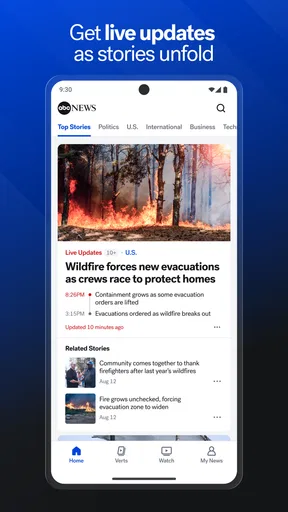
For a quick morning check, I would scan the main headlines first, then open only the stories that affect my plans or give useful background. That is more practical than treating a stream of updates as a reading list to clear. For a developing U.S. story, live coverage can be convenient when I want to follow along without searching for a television broadcast, while written reporting is easier to revisit when I need to check a detail later.
Worth Reading Before You Choose

EA SPORTS FC Mobile 26 Is a Bigger Football Game, but It Takes Time

Flipboard Shows What News Apps Must Do Beyond the Feed

Switching to Android Auto Means Rethinking Your Driving Routine

Google Calendar Makes a Crowded Week Easier to Manage

Ludo King Makes the Most of the Minutes Between Plans

Baby Panda World Brings Quick Play to Modern Phones, but Its Game Library Feels Busy
Finding a useful balance between alerts and reading
One helpful approach is to let an alert prompt a short check-in, then decide whether the story deserves more attention. A notification is a doorway, not a substitute for reading the full report. If several updates concern the same event, I would look for the most complete article or a live segment rather than opening every alert in sequence. That keeps the app useful without letting breaking coverage take over the day.
For example, if I hear about a significant event while getting ready for work, I can use a headline to understand the basic subject, then return to it later when I have time to read more carefully. If I am commuting with limited connectivity, I would avoid relying on video as my only way to follow the story. Text is usually the more practical format when the connection is inconsistent, and any reading option should be tested before I depend on it for a trip.
People often ask whether the app is worth installing if they already use a general news aggregator. I see the choice as a difference in editorial focus: an ABC app is a natural option for readers who want to follow ABC’s coverage, while an aggregator may be better when comparing reporting from several publishers in one place matters more. Neither approach automatically makes a story more reliable; I still recommend checking the reporting and seeking additional perspectives on consequential or contested issues.
Recovering when a session goes wrong
If a page stalls, I would close and reopen the app, check the connection, and try the story again before assuming the whole service is unavailable. If a live stream is the part that struggles, switching to written coverage is a sensible workaround when available. On a weak mobile signal, repeated attempts to start video may use time and data without adding much understanding, so it is worth asking whether watching live is essential or whether a written update will do.
If notifications stop appearing, check the phone’s notification controls and the app’s own alert choices before changing anything more drastic. If they arrive too frequently, narrow the topics or turn off the alerts that are not useful instead of disabling every notification at once. This small adjustment gives you a clearer idea of whether the issue is delivery or simply an alert setup that does not match your routine.
When a story seems missing, try browsing the relevant news section or searching through the app’s visible navigation rather than assuming the feed is broken. News coverage changes quickly, and the headline order may shift as new reporting arrives. If the same problem happens across unrelated stories and continues after a connection check and restart, it may be worth checking for an app update through the relevant app store and trying again.
When the app may not be the cause
A video that buffers or a headline that loads slowly can result from a weak connection, a busy public network, or temporary trouble elsewhere in the chain. If other online services are also slow, changing ABC News settings is unlikely to fix the underlying issue. I would try a different connection when practical, then return to the story later rather than repeatedly refreshing it.
There is also a difference between an app malfunction and a story not matching what a reader wants. A reader looking for extensive international coverage, a highly customizable cross-publisher briefing, or a quiet reading experience may prefer a different news product. ABC News is most useful when its reporting and presentation fit the reader’s needs; no amount of troubleshooting can turn a focused outlet into a multi-source aggregator.
Who will find it useful—and who may not
I can see this app working well for someone who already follows ABC, wants a convenient way to check U.S. headlines, and sometimes prefers to watch coverage on a phone. It may also suit a casual reader who wants to dip into current events without building a complicated news setup. The free price removes a purchase decision, but the more important question is whether the app’s coverage and pace feel right for you.
I would be less inclined to recommend it as a sole source for someone who needs a broad range of international perspectives or wants every story compared across multiple outlets. It may also be a poor match if push alerts are stressful, video is rarely useful to you, or you mainly want a carefully curated daily digest. In those cases, a newspaper app, a public broadcaster’s app, or an aggregator may better match the way you prefer to read.
What to expect from its audience and scope
The app has around 5,900 written reviews, which suggests many people have taken the time to share their experience, but review totals cannot tell me whether its current behavior will suit my phone or habits. I would use a short trial period to judge practical things: whether the sections are easy to navigate, whether notifications are worth keeping, and whether the coverage gives enough context for the stories I follow.
Another question is whether a free news app can replace every other source. I would not treat it that way. It can be a convenient place to start, particularly for ABC coverage and live updates, but important news is worth checking against additional credible reporting. That is especially true when early headlines are still developing or when a story has meaningful consequences beyond the first announcement.
First Impressions and Features
Upon firing up the app, you're greeted with a clean and user-friendly interface. Honestly, I was pleasantly surprised by how intuitive everything feels. The homepage is packed with the latest headlines, and navigating through the app is a breeze, even if you're not super tech-savvy.
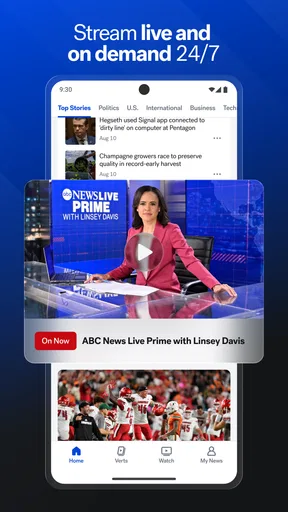
The app offers a variety of sections, from U.S. News to World News, Politics, and even Entertainment. What really caught my eye was the live video streaming feature. You can watch live broadcasts directly from your phone, which is perfect for those moments when you can't be near a TV.
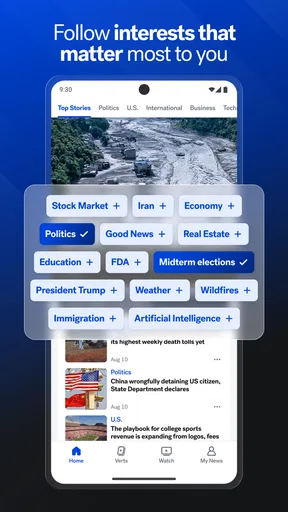
Another neat feature is the personalized alerts. You can set up notifications for specific topics or events. I signed up for alerts on tech news and it's been a game-changer. No more missing out on the latest gadget release or tech breakthrough!
Performance and Usability
In terms of performance, the ABC News: Breaking News Live app runs smoothly on both Android and iOS. I didn’t experience any crashes or slowdowns, even during live video streams. The app’s developers clearly put a lot of effort into ensuring a seamless experience.
One thing I particularly liked is the offline reading option. You can save articles to read later, which is perfect for those times when you’re commuting or in a spotty network area. It's like having a portable newsstand in your pocket!
Engagement and Community
For those who love to dive deep into the news, the app offers a comments section where users can discuss the articles. It's a great way to engage with other news enthusiasts and share perspectives. Sometimes, the discussions get lively, and it adds to the overall experience of staying informed.
Final Thoughts
All in all, I’d say ABC News: Breaking News Live is a solid choice for anyone who wants to keep their finger on the pulse of current events. Whether you're a news junkie or just someone who likes to stay informed, this app has something for everyone. The combination of live streaming, personalized alerts, and offline reading makes it a versatile news hub right in the palm of your hand. Give it a try and see if it becomes your go-to news source!
Pros
- User-friendly interface with smooth navigation.
- Real-time alerts keep you updated instantly.
- Customizable news categories for tailored content.
- High-quality video streaming for live events.
- Offline reading mode for on-the-go access.
Cons
- Frequent ads can disrupt user experience.
- Some articles lack in-depth analysis.
- Occasional app crashes on older devices.
- Limited international news coverage.
- Requires account for personalized features.
FAQs for ABC News: Breaking News Live
What platforms is the ABC News: Breaking News Live app available on?
The ABC News: Breaking News Live app is available for download on both Android and iOS platforms. Users can find it on the Google Play Store for Android devices and the Apple App Store for iOS devices. Ensure your device meets the minimum system requirements for a smooth experience.
Can I customize the type of news alerts I receive?
Yes, the app allows users to customize their news alerts. You can select specific categories like politics, technology, sports, or entertainment to tailor the alerts to your interests. This customization ensures you receive notifications that are most relevant to you, keeping you informed without overwhelming you with unnecessary updates.
Does the app offer live streaming of news broadcasts?
The ABC News app provides live streaming of news broadcasts, allowing users to watch breaking news events as they happen. This feature is particularly useful for staying updated on major events and provides real-time coverage that keeps you informed no matter where you are.
Is there a subscription fee to use the ABC News app?
The ABC News: Breaking News Live app is free to download and use. While it offers access to a wide range of content without a subscription, some features or premium content may require an account or additional services, so it's worth checking for any optional in-app purchases or subscriptions.
How frequently is the news content updated in the app?
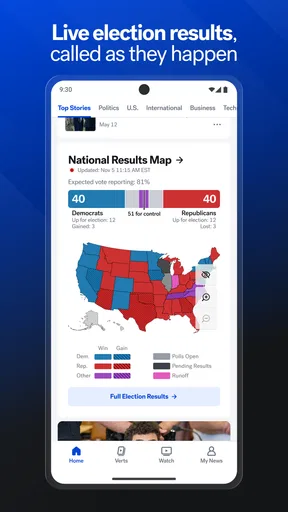
The ABC News app is designed to provide real-time updates, ensuring that users receive current and accurate news. Content is updated continuously throughout the day, with breaking news alerts sent as events unfold. This ensures users have access to the latest news whenever they open the app.


